SeisComP released in version 7.4
Sep 4, 2026
Categories:
Products
SeisComP in the new minor version 7.4 was released on 04 September 2026 focusing on a few important fixes and many key improvements: Consistent ML-type magnitudes when computed in IASPEI mode, upgraded LOCSAT locator, enhanced synchronization of event parameters between SeisComP instances connected by QuakeLink, generation of unique event IDs consistent across two SeisComP instances, scmvx and scconfig largely upgraded for advanced user interaction and scolv now allowing the integration of felt reports for events.
Many other valuable features, optimizations, and improvements were added to the
graphical interfaces, daemon modules, and command-line tools. The database
schema has not been upgraded and is still in version 0.14. The technical
changelog
provides
a concise overview of all changes. In total, 1200 files were modified, with
399848
insertions and 364039
deletions. The majority of those changes
is related to the update and cleanup of the cities.xml file which accounts for
350419
insertions and 352519
deletions by itself.
Important changes in a nutshell
SeisComP in version 7.0 introduced a fix to the measurement of ML-type amplitudes in IASPEI mode which can be activated by configuration. With versions prior to 7.0, amplitudes measured peak to trough in IASPEI mode were not divided by 2, which is inconsistent with the non-IASPEI implementation and not in accordance with IASPEI recommendations. Version 7.0 corrected this. Magnitude calibrations from amplitudes measured peak to trough in IASPEI mode and with SeisComP in version < 7 must be recomputed from corrected amplitudes. Without any further configuration changes, you will notice ML* magnitudes offset by about −0.3 (−log(2)). Furthermore the resulting SNR is halved. You will need to account for this in your calibration function and the minSNR configuration.
Unfortunately, this change was not clearly announced with the release of version 7.0 and we are using this release note to address it.
Furthermore, the LOCSAT code has been fixed to properly initialize variables and to correctly read travel-time tables. As a result hypocenter parameters are now consistent across different Linux flavors and compiler versions. This change can, however, lead to slightly different hypocenters as compared to older versions.
Creating unique public IDs of events in multiple SeisComP systems and synchronizing parameters of preferred origins after manual intervention across SeisComP systems has been a challenge. With new or upgraded functionality in scevent and ql2sc these issues can now be resolved.
scmvx has become an efficient tool for testing and reporting the configuration of stations of interest by means of more interactive stations search or network filtering for stations that are currently open or closed.
scconfig has been upgraded for more configuration options for files, directories, colors and lists by means of respective interactive editors and you will even see the colors which you have defined. Command-line options now help you navigate directly at startup.
Upgrading to SeisComP in version 7.4
You can download and install the new SeisComP package from the SeisComP website or from our package server at gempa . The gempa server also provides the documentation inside the package. If you use SeisComP together with gempa modules, all gempa modules must be upgraded as well. For this type of installation or upgrade, and also in general, we recommend using our gempa software manager (gsm) .
Upgrading to SeisComP in version 7.4 from version 4 or newer is easy and fast. Please read and follow the upgrade instructions in the online documentation . When upgrading from SeisComP3, a few additional steps are required, which are also explained in detail online .
For new users, we provide a short video showing the first configuration steps.
Upgrade the database
After upgrading SeisComP to this new release from versions lower than 7 a database upgrade is required unless you have already worked with a recent version of our nightly SeisComP packages or a recent compilation from source code.
The current and expected database versions will be tested and the required actions will be shown when executing
seiscomp update-config
or when pressing the Update config button in scconfig. An upgrade from version 6.9.1 will give:
* starting kernel modules
scmaster is already running
* configure kernel
* configure scmaster
INFO: Checking queue 'production'
  * checking DB schema version
  * check database write access ... passed
  * database schema version is 0.13
  * last migration version is 0.14
  * migration to the current version is required. Apply the following
    database migration scripts in exactly the given order:
    * seiscomp stop
    * mysql -u sysop -h localhost -p seiscomp < /home/sysop/seiscomp/share/db/migrations/mysql/0_13_2_to_0_14.sql
    * seiscomp start
error: updating configuration for scmaster failed
The shown database command can be used in a command-line terminal for upgrading the database schema version:
seiscomp stop
mysql -u sysop -h localhost -p seiscomp < /home/sysop/seiscomp/share/db/migrations/mysql/0_13_2_to_0_14.sql
seiscomp update-config
seiscomp start
Test your configuration
Since some parameters from previous SeisComP versions may have been renamed, removed or deprecated we recommend testing your configuration and adjusting if required. For testing we provide the script gempa-checkSCconfig.py which you may download and use at your convenience.
We recommend using gsm for all SeisComP software installations including this check script:
gsm install seiscomp-tools
As the script is maintained and new parameters may be added we recommend always downloading and working with the latest version. Read the command-line help first before continuing:
After installation by gsm:
gempa-checkSCconfig -hOr after manual download and installation:
python3 gempa-checkSCconfig.py -h
The output will tell you the recommended actions.
More details and features
From the very long list of novelties set out in the changelog we would like to highlight a few in the following.
Graphical user interfaces
New buttons and services have been implemented and added to scolv, scmvx and scconfig making their application much more powerful and intuitive.
scolv
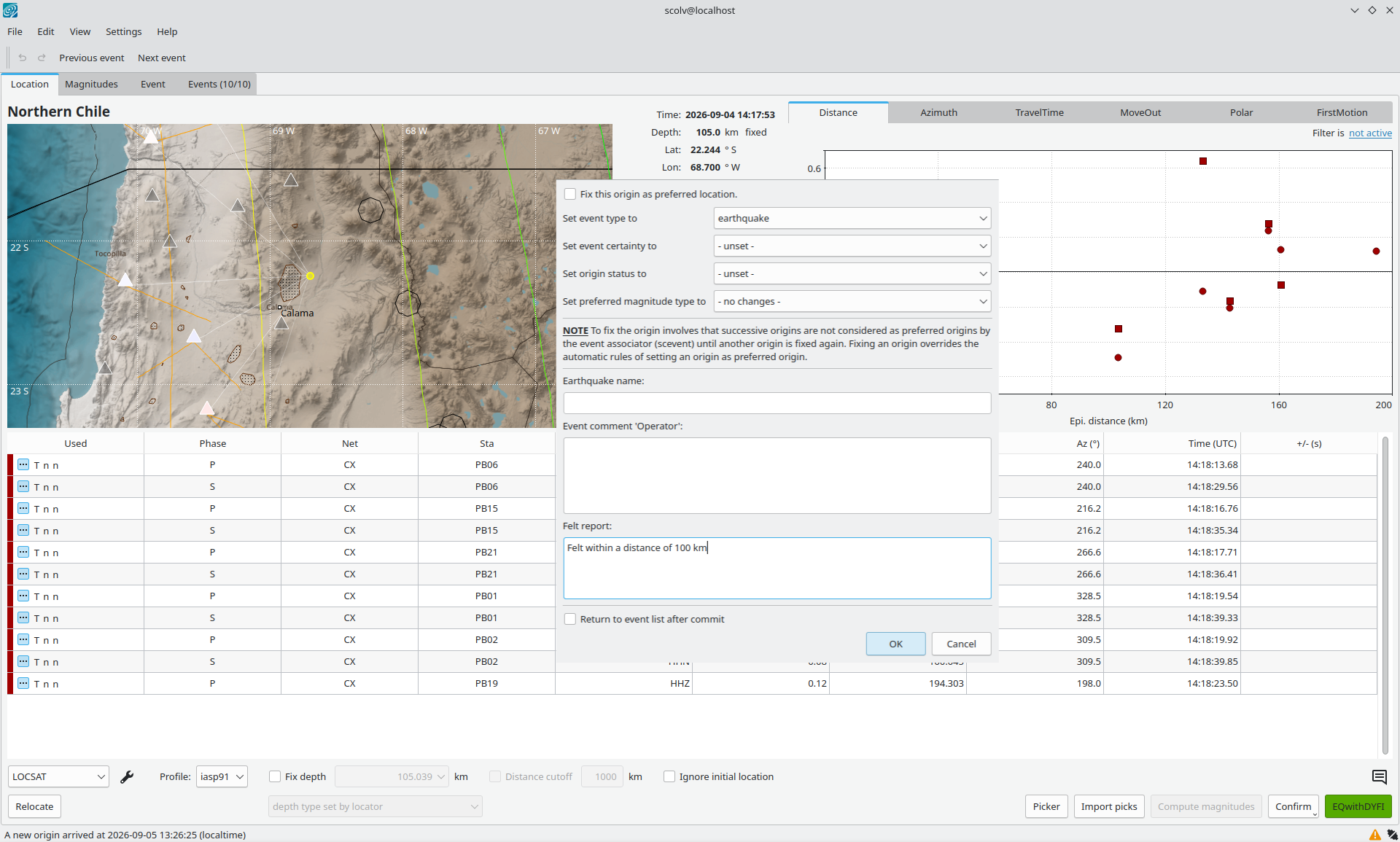
scolv custom commit with pre-set and editable felt report.
When committing origins with additional options Felt reports may be entered adding more descriptions to the event. When a custom commit button is configured, you may event preset the felt report with some standard text. The text may still be edited if you have configured that custom commit button to open a confirmation dialog before committing.
Adding a felt report will populate the
event.description["felt report"]
attribute.
scmvx
scmvx has been extended further to search stations and filter by network, identify issues or simply enable or disable stations for controlling the data processing.
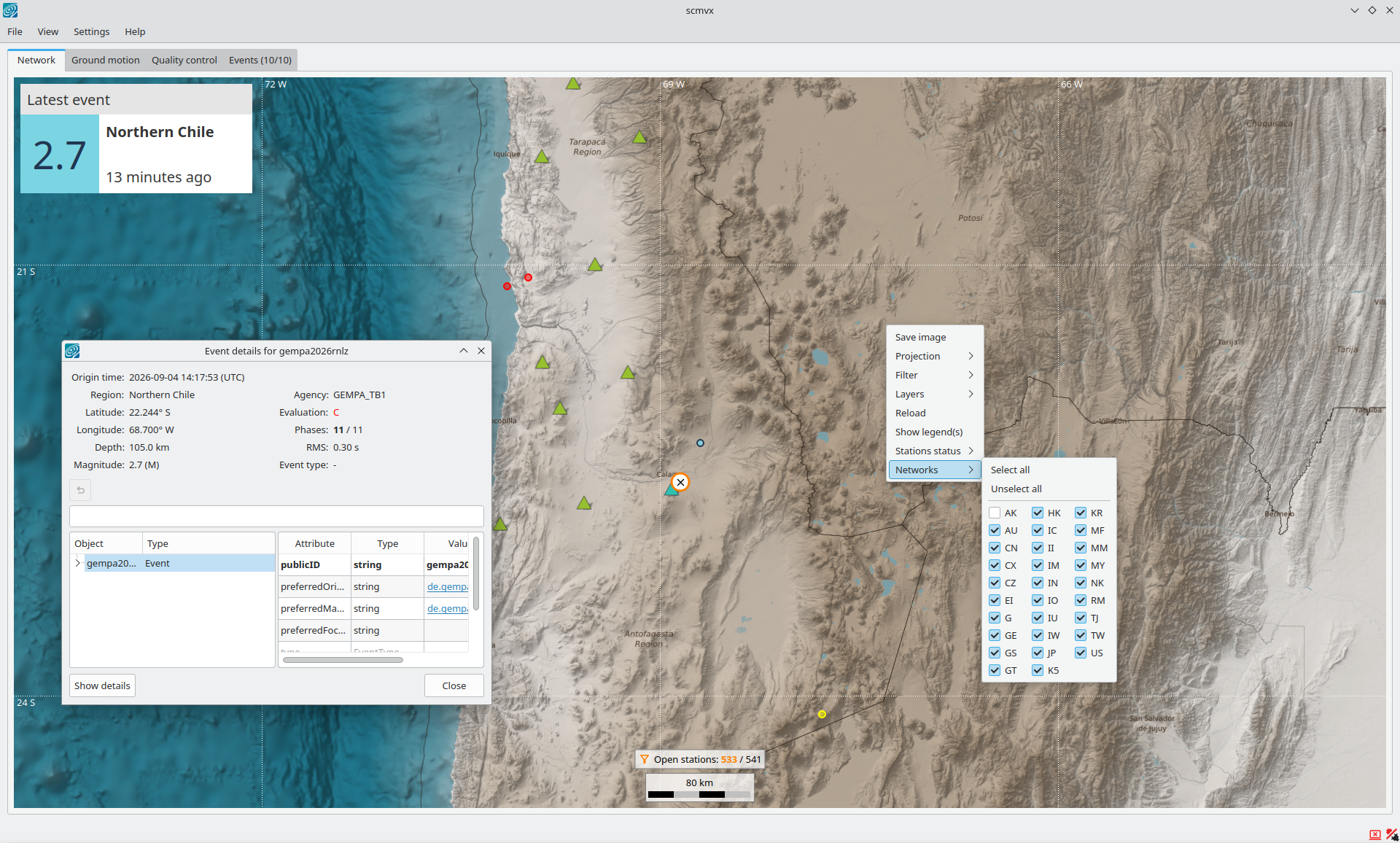
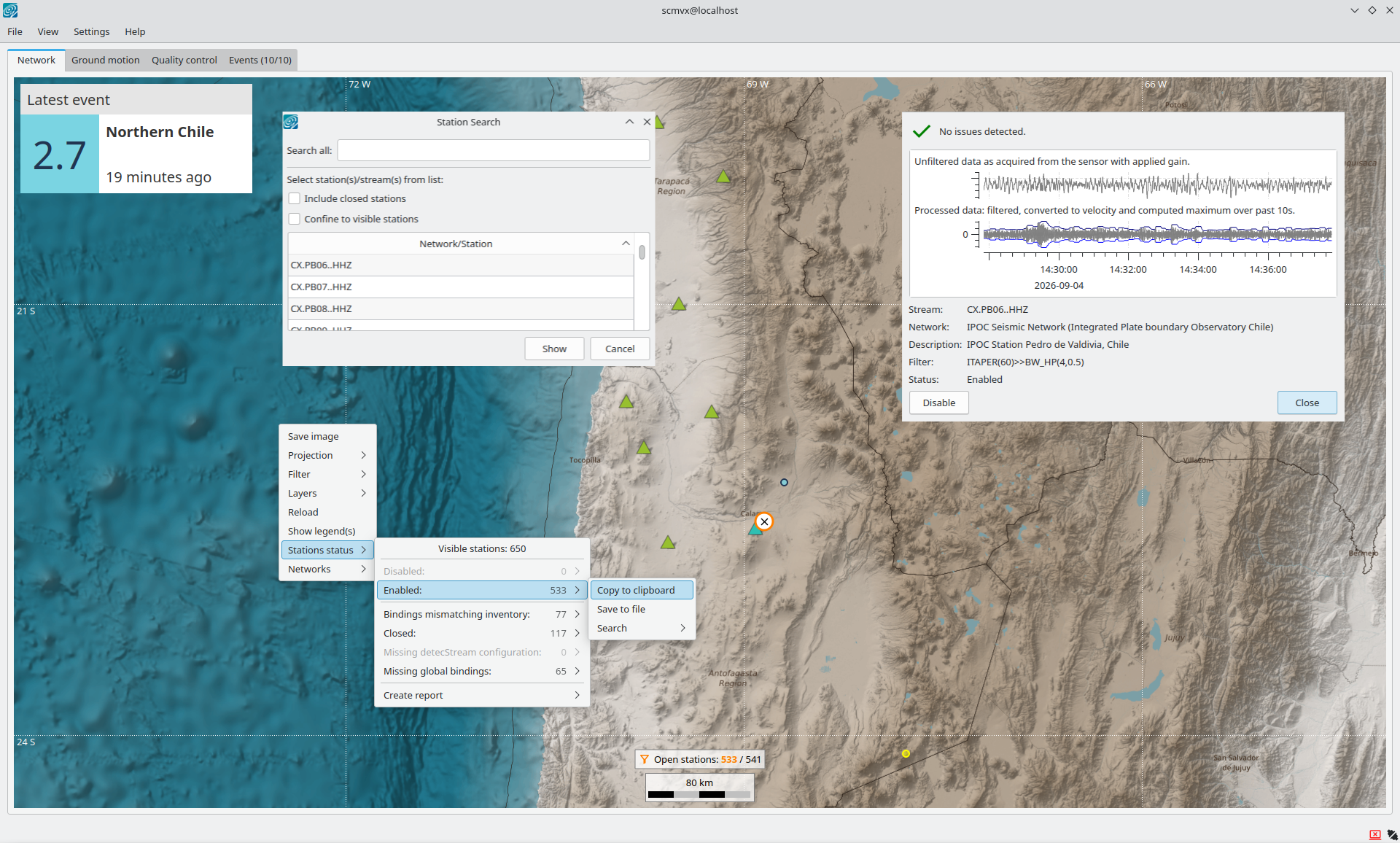
- Filtering is provided by right-clicking on the map or selecting the network filter in the View menu. After filtering, the station count is indicated in the lower part. Also click on this new button to adjust the filter.
- When all streams from a station were closed in the past, the station is invisible by default. Now you may select to show also such closed stations from the View menu. This brings up the station symbol indicated by an orange symbol next to it.
- Searching for stations is now more specific and efficient since closed stations can be included and it can be confined to the actually visible stations: A plus when filtering is applied beforehand.
- You may now enable or disable stations for automatic data processing by selecting the station on the map and clicking the action button in the station widget. In this way the geometry of monitoring networks can be controlled also in scmvx.
- The network tab visualizes stations with issues in inventory or global bindings configuration. Now, also stations without any currently open stream epoch can be visualized from the View menu. You specifically search for those stations, list them or send the stream codes to a custom script for further processing. Access these features from the File menu or by right-clicking on the map.
- The latest event widget draws attention to the displayed event. Click on the button to center the map and to read more details.
scconfig
Besides a few optimizations and fixes scconfig has received more functionality making the configuration of SeisComP modules easier, faster and more reliable.
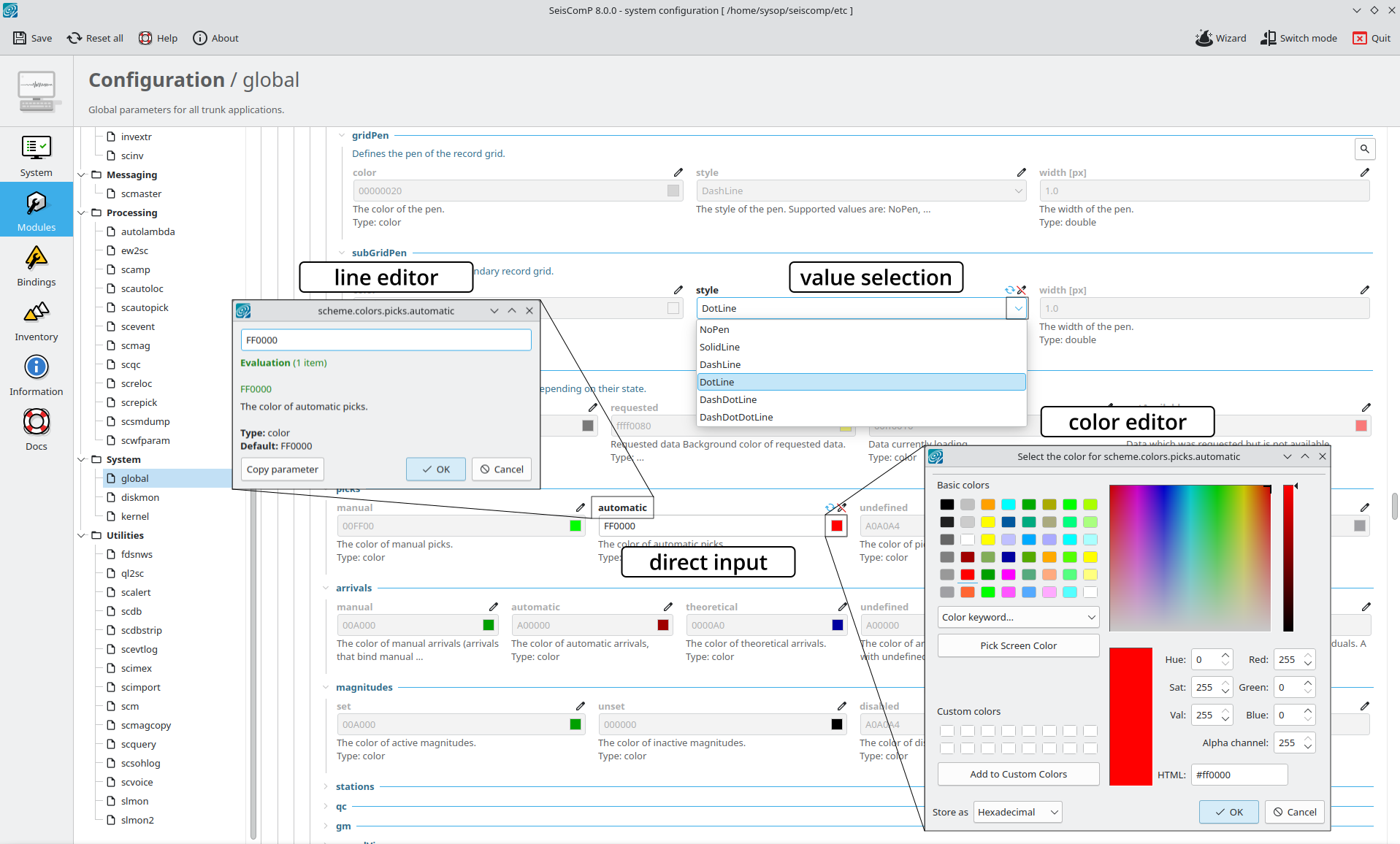
All text in the Information panel may now be clicked and copied to clipboard for application elsewhere. Use your right mouse button for copying and pasting.
Binding profiles in the Bindings panel are now sorted alphabetically for better readability.
When navigating to the Modules panel the global module configuration opens by default.
When switching the configuration mode between user and system you will be asked to save parameters in case of any prior changes. This ensures, that your configuration ends up in the right place.
Empty parameters are not reported anymore as errors but with the corresponding information which is more correct.
A new checkbox in the search dialog allows to exclude global parameters for focusing on the specific module parameters.
More command-line options have been added which you can learn about with the new help option,
-h/--help.The new command-line option
-pallows selecting a panel directly during startup. For example you may directly navigate to the global parameters in the Modules panel byscconfig -p 2Combining
-pwith-mand module name opens the parameters for the module in the respective panel.When opening scconfig with the Bindings panel and using
-swith a station name the bindings for that station will open. Along with-mand the the module name even the respective binding parameters are shown. Use is as follows:scconfig -p 3 -m scautopick -s GE.APEYou may even directly navigate to a configuration parameter given along with
--parameterand in combination with-pand-mlikescconfig -p 2 -m scolv --parameter scripts.script0for module configuration parameters or
scconfig -p 3 -m global -s GE.APE --parameter detecStreamfor bindings.
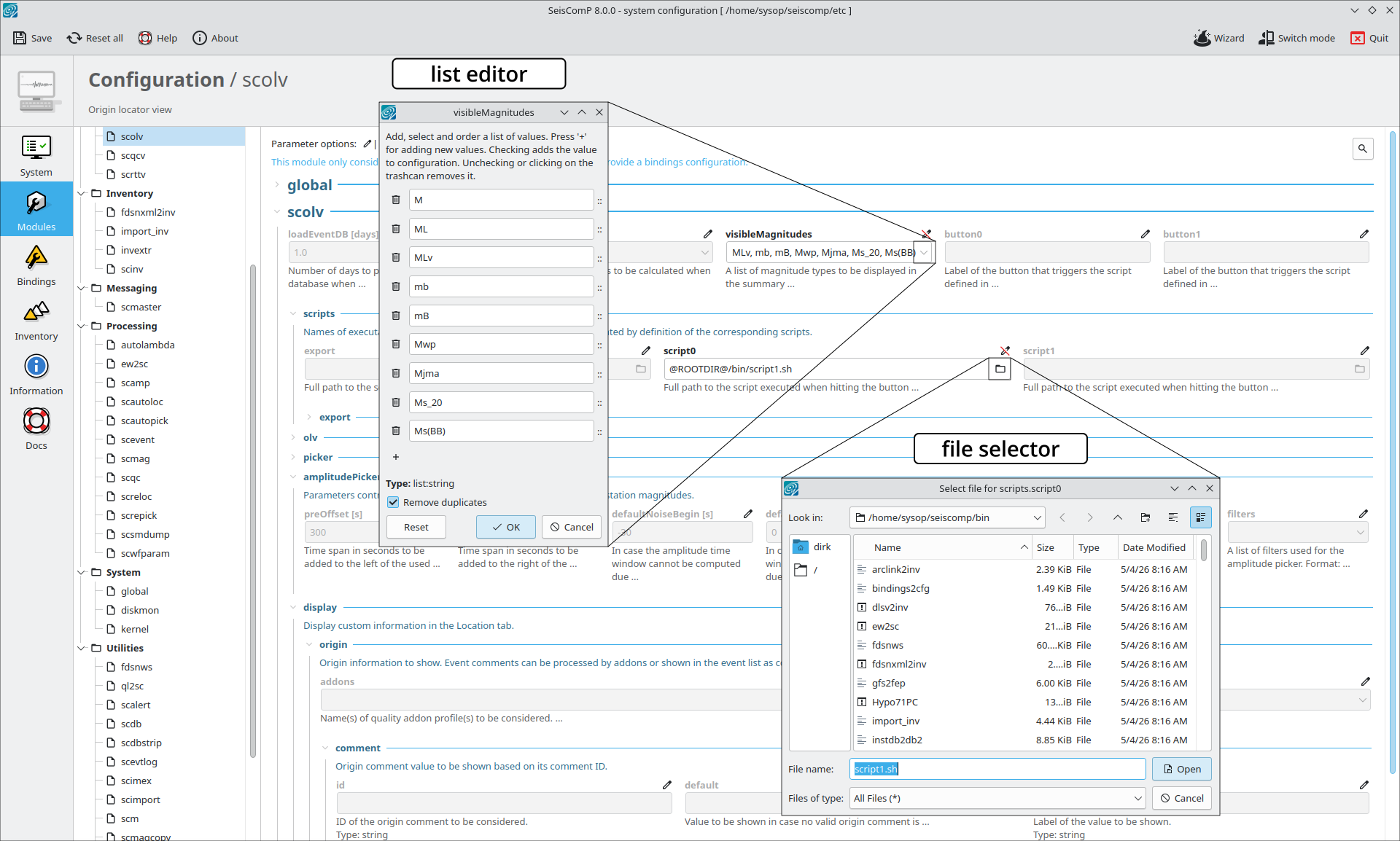
For parameters defining files or directories, an interactive browser can now be used by clicking on the browser button in the parameter value field.
When a parameter is a color, an interactive color editor is now available, allowing you to configure colors as color names, RGB, RGBA or hexadecimal values. Colors can also be selected from those currently configured, helping to limit the amount of used colors.
When a parameter is a date and time an interactive date and time editor can now be started by clicking on the calendar button in the parameter value field.
The cursor position is set to the parameter input field when starting to edit.
Long parameter values such as for
recordstreamordatabasecan now be conveniently adjusted by a line editor. The line editor is invoked by clicking on the parameter name. The line editor also provide the option to copy the parameter along with the value for pasting elsewhere.When values are pre-defined, they can be selected from a drop-down menu. Click on the corresponding icon in the value field.
In module or bindings configuration, the list of pre-defined parameter values can be selected from combo boxes, except for lists of files and directories.
When parameters are read from an include file or, except for standalone modules, bindings parameters are defined in the module configuration starting with
module.trunkan information text shows up on the top of the parameter field in the Modules or Bindings panel. Includes and binding parameters in module configuration are defined asinclude [file name] module.trunk.[...]
Amplitudes and magnitudes
- ML-type amplitudes measured with the IASPEI-compliant peak-to-trough method underwent a correction which was published already with SeisComP in version 7.0 but the announcement was only made with version 7.4. The consequences and recommended actions are outlined in “Important changes in a nutshell”.
- For Ms_20 amplitudes, the configuration parameters
amplitudes.Ms_20.minVelocityandamplitudes.Ms_20.maxVelocityhave been dropped and need to be renamed toamplitudes.Ms_20.signalEndandamplitudes.Ms_20.signalBegin, respectively, which is now consistent with all other amplitude types. Old parameters still configured will be identified with the latest update of gempa-checkSCconfig.
LOCSAT: Travel-time interface and locator
LOCSAT has received a major code cleanup and fixes in variable initialization. The changes result in enhanced stability and reproducibility of the locator also when built with different compilers and on different Linux flavors. Although the resulting hypocenters may show differences compared to previous versions, the differences are expected to be rare and, if they occur, small within a few hundred meters only. Our internal tests have shown that now origin creation is now more reliable. The differences to previous versions mainly occur when locating by ignoring the initial location.
Connection to messaging
If you have specifically configured the connection of modules to the messaging, then
you need to consider the obsolete parameter messaging.encoding which must be renamed
to messaging.contentType. Ultimately consider the parameter description, e.g.
presented in scconfig.
Travel-time interface homogeneous
The homogeneous travel-time interface has been upgraded by the new parameter
ttt.homogeneous.[profile].velocities allowing you to configure any phase type for
homogeneous media including infrasound or hydro-acoustic phases. When done, remember
to also configure them in scolv for predicting arrivals on data or even for phase
picking. The traveltimes may also be used with SeisComP’s locators StdLoc or
FixedHypocenter
Automatic modules and command-line tools
scevent
A major step towards remote event IDs synchronized across two SeisComP systems is added
by the scevent configuration parameter restAPI. With this option, event IDs can be
equally allocated on the systems, e.g., when one system creates a new event with some ID,
this ID cannot be used anymore on the other system for another event. This guarantees
compatibility of events across systems although with different monitoring targets and
configurations. A more detailed description of the strategy is given along with the
technical documentation of scevent
.
ql2sc
ql2sc has been upgraded for a more complete synchronization of event parameters involving our QuakeLink package.
- Add option
strictModificationTimewhich if enabled will block adding / removing local childs. This requiresscmagto be configured withupdateParent = true. - Fix forwarding EvPrefMw journal. Thise fixes in particular an issue when an incoming revision has fixed an Mw magnitude but ql2sc just checked the timestamp when any magnitude has been set. As both operations use different journals, the timestamps were computed incorrectly and the local update was rejected.
- Only request a local magnitude type change if the remote revision includes a more recent journal to do so or if the local version does not have a journal regarding that operation yet.
- We added the module configuration parameter
syncJournalsallowing to forward event journals fromquakelinkto the local system. Activating this option also allows you to synchronize changes made to the event by operators. As journals are more a semantical description of the actions applied this is more performant and reliable than synchronizing event attributes. If this mode is enabled, then synchronizing event attributes and event preferred pointers should be disabled. - We have fixed the default routing configuration.
- We have added support for transmitting “felt report” descriptions which can be entered, e.g., by scolv (read above).
scautoloc
scautoloc underwent major code review and optimization.
- Picks without mb period values will now be considered assuming a period of 1, instead of being ignored as in previous versions. This update changes the behavior of scautoloc if more picks become available for processing. On the other hand, mb amplitudes do not need to be measured anymore with scautopick and can be left for scamp, limiting disk space consumption and computational load to only those amplitudes needed for later downstream data processing.
- The new CLI option
--timingalong with the argument creationTime will let scautoloc consider phase picks in the order of their creation rather than their pick time. This option therefore supports playbacks of picks measured in real time with greater fidelity since the ground-truth availability of picks is their time of creation rather than their time. - Considering the module configuration parameter
autoloc.useManualPicksmanual phase picks can now be processed independent ofautoloc.useManualOrigins. This supports processing of phase picks made by operators in real time with scolv or other tools for phase picking.
