SeisComP released in version 7
Dec 1, 2025
Categories:
Products
We have released SeisComP in the new version 7. This major release focuses on several key improvements: full ARM64 support in addition to x86_64, handling of dates outside the 1902–2038 range, better usability in graphical tools such as scolv and scconfig, the introduction of scmvx (our new map view), and significant advances in amplitude and magnitude measurement and computation.
Many other valuable features, optimizations, and improvements were added to the graphical interfaces, daemon modules, and command-line tools. The database schema has been upgraded to version 0.14. The technical changelog provides a concise overview of all changes. In total, 4640 files were modifed, with 366755 insertions and 254412 deletions.
Important changes in a nutshell
- SeisComP 7 now supports ARM64 (aarch64) processors in addition to x86_64.
- Qt 6 and newer compilers are supported to ensure compatibility with current Linux distributions.
- Date storage is extended to 64-bit, allowing dates ranging from −28164-12-21 to 32103-01-10.
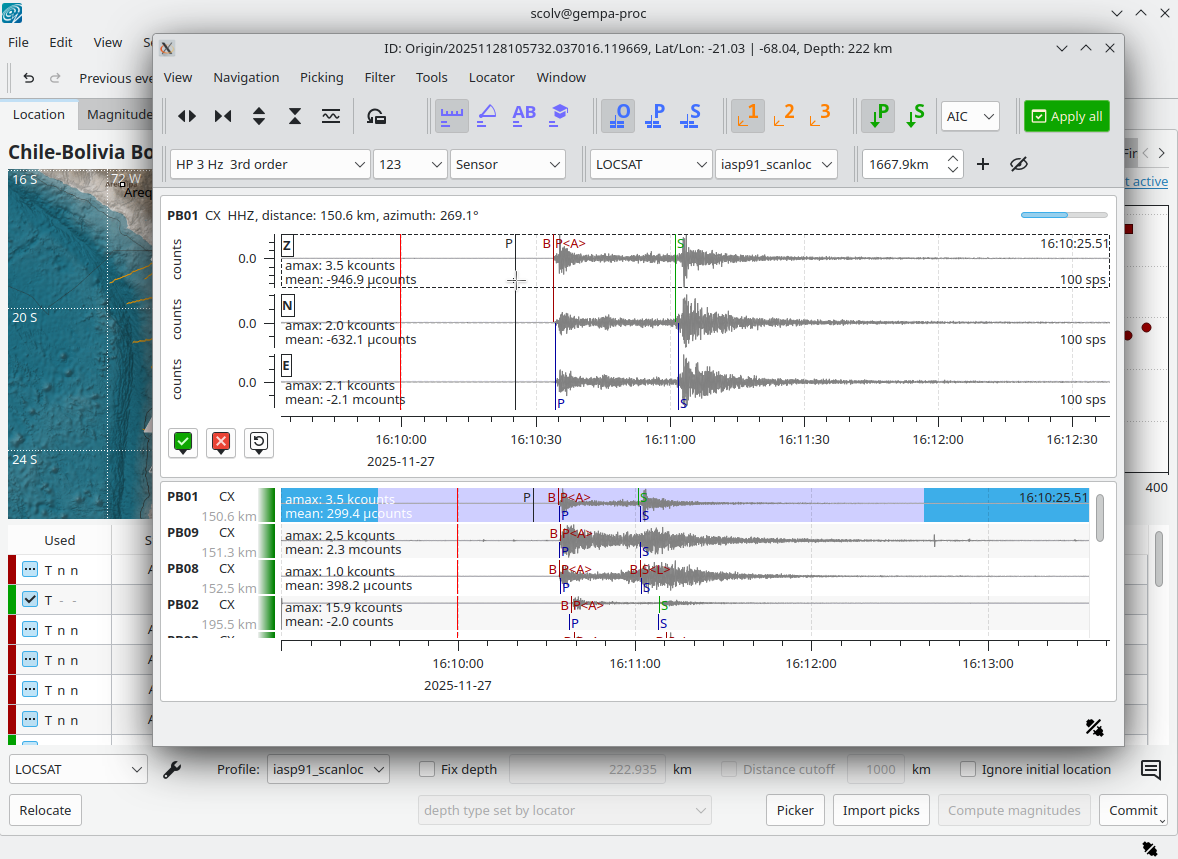
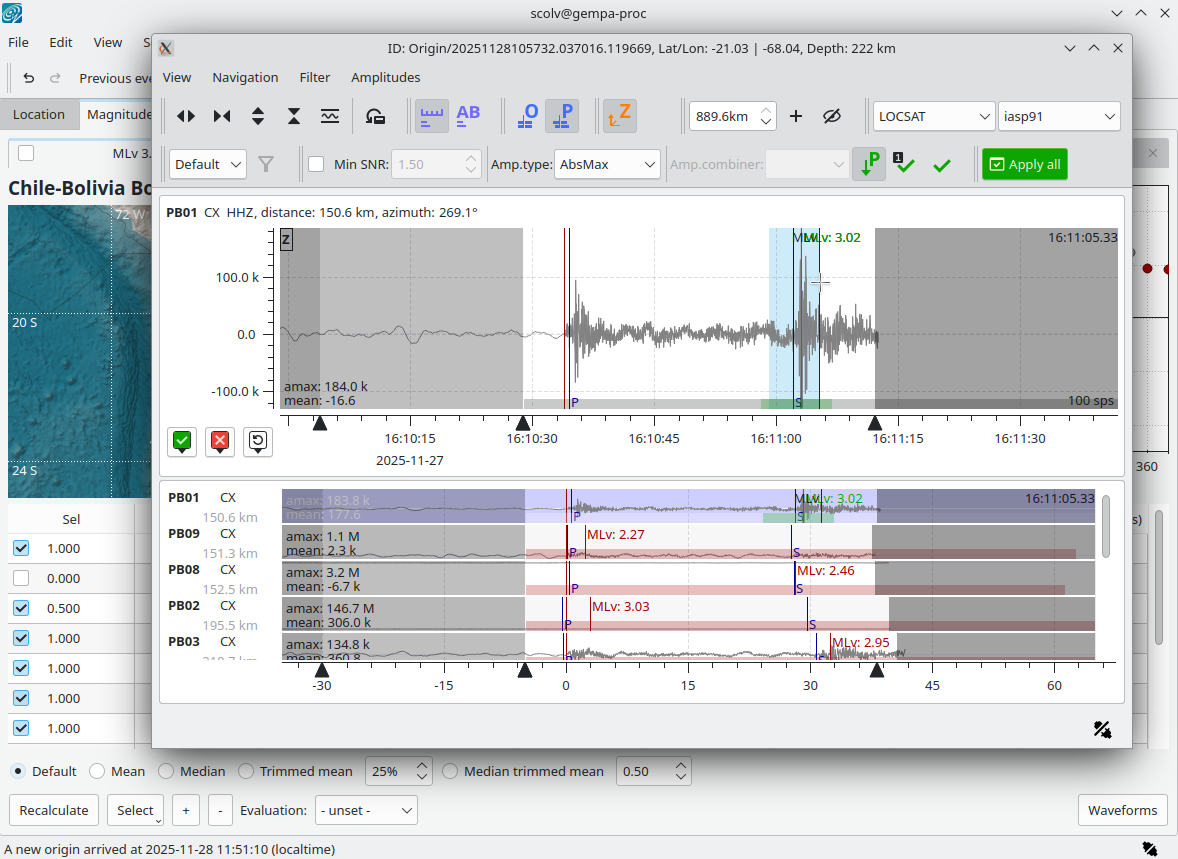
- The scolv phase and amplitude picker windows have been redesigned, and scconfig has been improved for better usability.
- The new map view scmvx is introduced and is intended to replace scmv in a future release.
- In addition to miniSEED version 2, most SeisComP processing and analysis modules now also support miniSEED version 3.
- The database schema has been upgraded to version 0.14.
- The API version has been updated to 17.0.0.
- Extensive internal clean-ups, bug fixes, and general improvements.
Upgrading to SeisComP in version 7
You can download and install the new SeisComP package from the SeisComP website or from our package server at gempa . The gempa server also provides the documentation inside the package. If you use SeisComP together with gempa modules, all gempa modules must be upgraded as well. For this type of installation or upgrade, and also in general, we recommend using our gempa software manager (gsm) .
Upgrading to SeisComP version 7 from version 4 or newer is easy and fast. Please read and follow the upgrade instructions in the online documentation . When upgrading from SeisComP3, a few additional steps are required, which are also explained in detail online .
For new users, we provide a short video showing the first configuration steps.
Upgrade the database
After upgrading SeisComP to this new release a database upgrade is required unless you have already worked with a recent version of our nightly SeisComP packages or a recent compilation from source code.
The current and the expected database version will be tested and the required actions will be shown when executing
seiscomp update-config
or when pressing the Update Config button in scconfig. An upgrade from version 6.9.1 will give:
* starting kernel modules
scmaster is already running
* configure kernel
* configure scmaster
INFO: Checking queue 'production'
  * checking DB schema version
  * check database write access ... passed
  * database schema version is 0.13
  * last migration version is 0.14
  * migration to the current version is required. Apply the following
    database migration scripts in exactly the given order:
    * seiscomp stop
    * mysql -u sysop -h localhost -p seiscomp < /home/sysop/seiscomp/share/db/migrations/mysql/0_13_2_to_0_14.sql
    * seiscomp start
error: updating configuration for scmaster failed
The shown database command can be used in a command-line terminal for upgrading the database schema version:
seiscomp stop
mysql -u sysop -h localhost -p seiscomp < /home/sysop/seiscomp/share/db/migrations/mysql/0_13_2_to_0_14.sql
seiscomp update-config
seiscomp start
Test your configuration
Since some parameters from previous SeisComP version have been renamed, removed or deprecated we recommend to test your configuration and adjust if required. For testing we provide the script gempa-checkSCconfig.py which you may download and use at your convenience.
We recommend to use gsm for all SeisComP software installation including this check script:
gsm install seiscomp-tools
As the script is maintained and new parameters may be added we recommend to always download and work with the latest version. Read the command-line help first before continuing:
After installation by gsm:
gempa-checkSCconfig -hAfter manual download:
python3 gempa-checkSCconfig.py -h
The output will tell you the recommended actions.
More details and features
From the very long list of novelties set out in the changelog we would like to highlight very few in the following.
Graphical user interfaces
New buttons and services have been implemented and added to scolv and scconfig making their application much more powerful and intuitive. Among others, in all modules showing maps you may now zoom in interactively by rubber band: Press ⇧ + drag with your mouse to conveniently zoom in to the selected area.
scolv
From the scolv Location tab you may Relocate, open the phase and amplitude picker windows using hotkeys like R, P and M, respectively. Not only the design of the action buttons in the picker windows have been updated but also the colors are now more consistent: Green refers to manual actions like phase and amplitude picking or applying a solution. Buttons which have triggered an active action are highlighted.
The phase picker now also supports seismogram rotation into LQT coordinates and to conveniently load data from specific networks and stations through the new Add stations item of the Tools menu. You may further configure profiles for auxiliary streams which can be added to the picker window, e.g, in order to support simultaneous processing of weak and strong motion sensors.
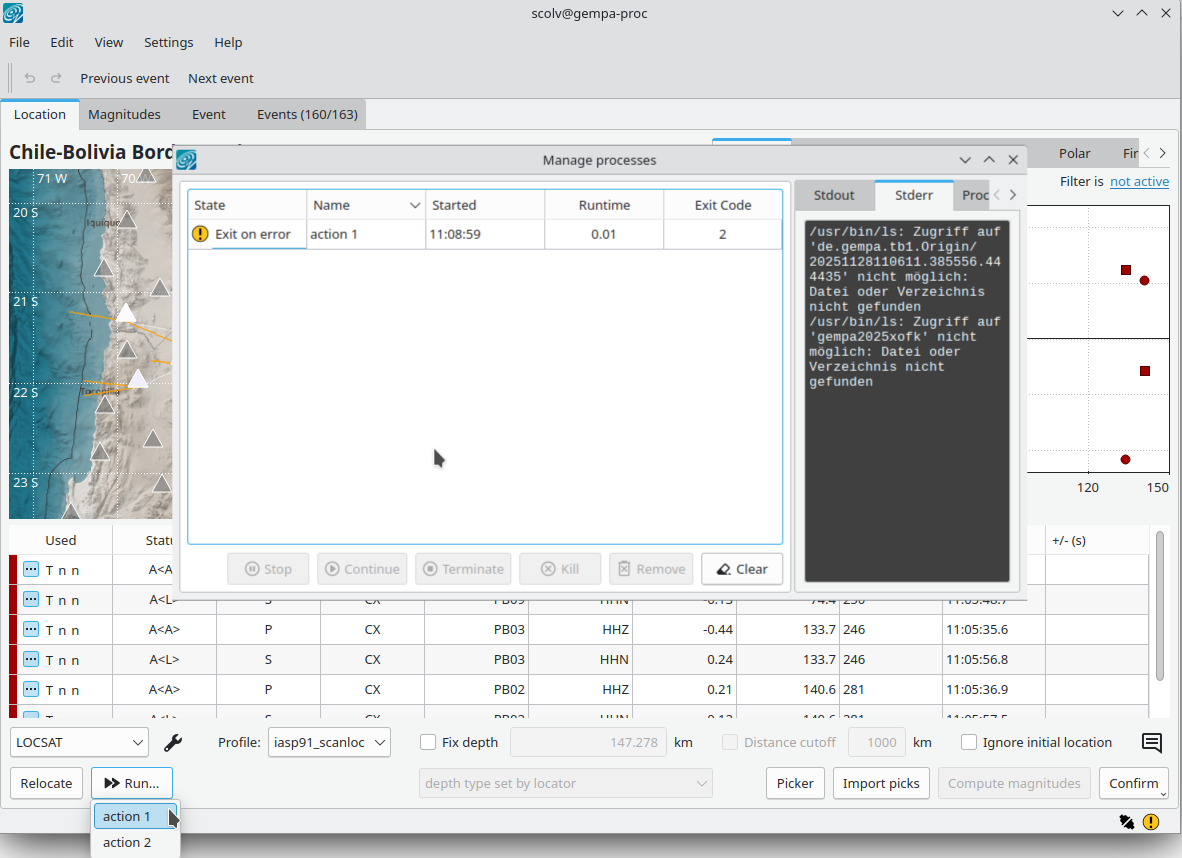
Any number of custom menu actions can be configured similar to the before existing custom buttons. However the number is now unlimited offering a very high degree of additional freedom for custom procedures. When such a custom menu action is configured, a new Run menu with all actions appears next to the known Relocate button.
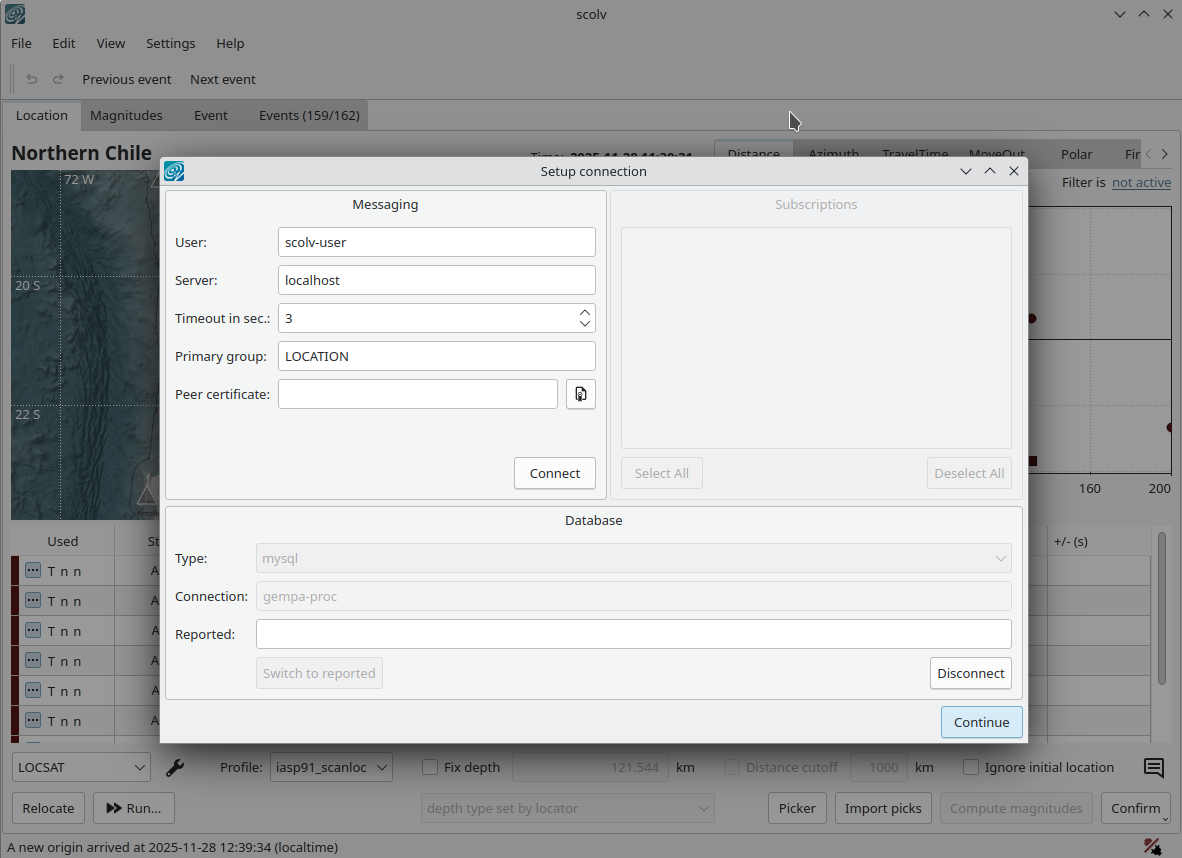
Consider situations in which the connection to messaging gets lots, maybe due to network outages. The connection state is clearly indicated in the lower right of any graphical module. You may click on that connection button to open the connection dialog allowing you to establish the connection again.
scconfig
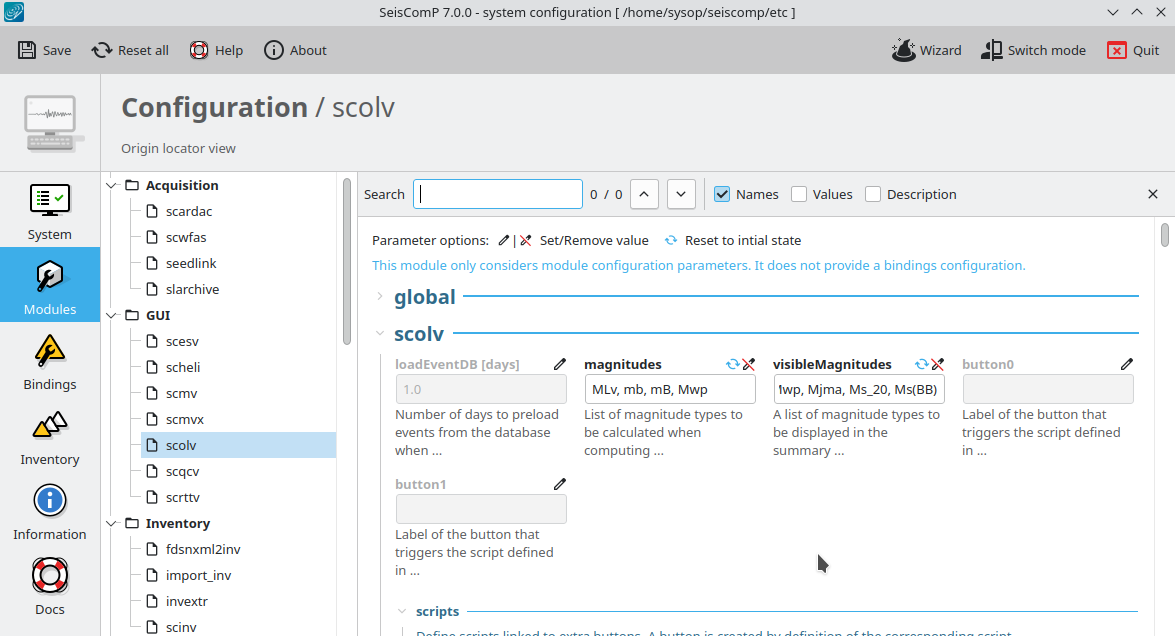
scconfig has not only received a much fresher look. We have also reorganized the panels bringing those to the top which are used at most. Actions are now provided by clear buttons but the former mode switch has been deactivated and it now only serves as a mode indicator.
In the Modules and Bindings panels:
- We have greatly advanced the search functionality. You may now search for parameter names and values or their description and step through all matches.
- When a parameter was changed, you may now either reset it individually to the previous value or to default by the remove and the reset buttons above the parameters, respectively. As before you may also reset all in a single step using the new Reset all button.
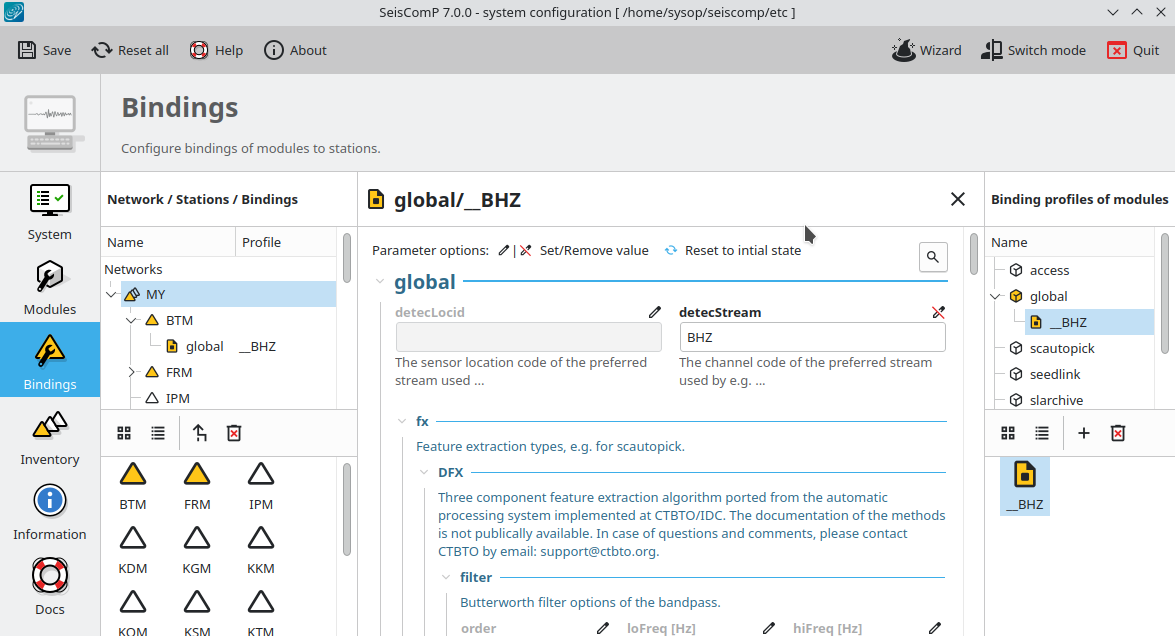
- When a bindings profile has been selected for editing, all instances where the profile is available or bound are clearly indicated by yellow symbols allowing you to identify the affected networks and stations.
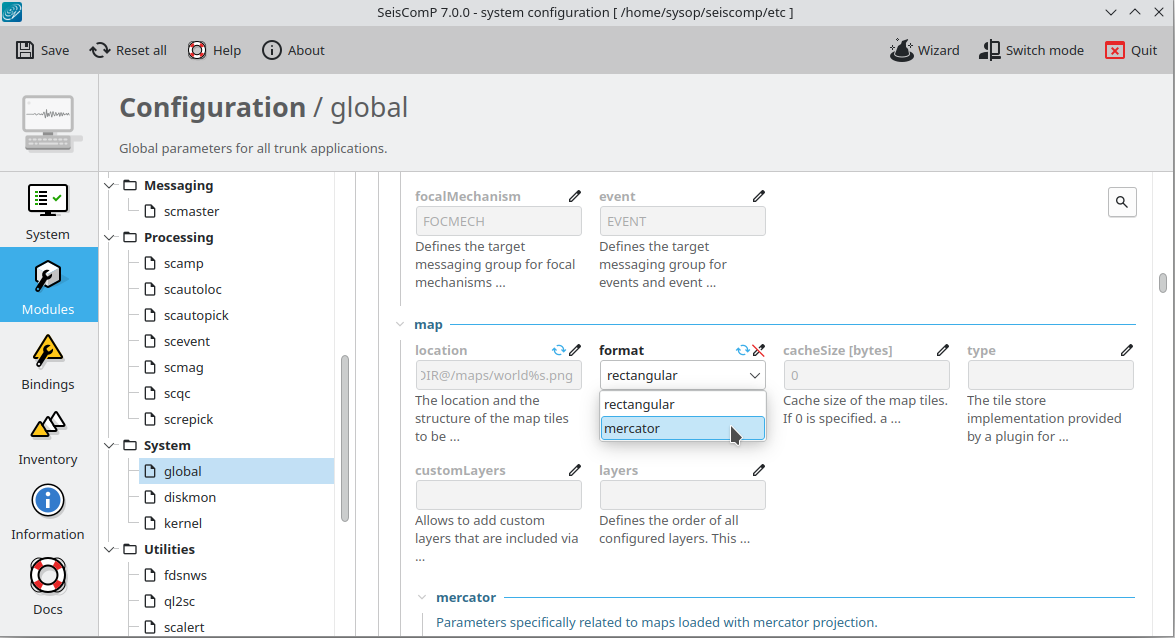
- If a pre-defined list of supported values exists along with the parameter description, then these values can be selected in a drop-down menu showing the supported values and minimizing the chance for typos.
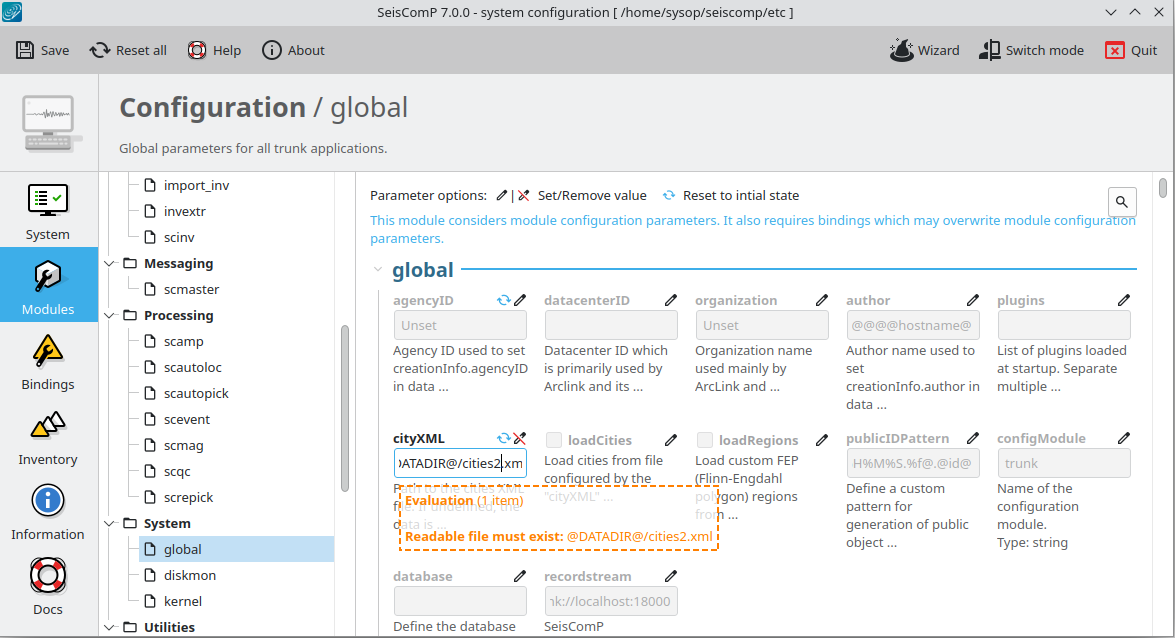
- A more advanced evaluation of the configured parameter values will now print issues, e.g., in case a float is provided but an integer is assumed or a file name is set but the files actually does not exist.
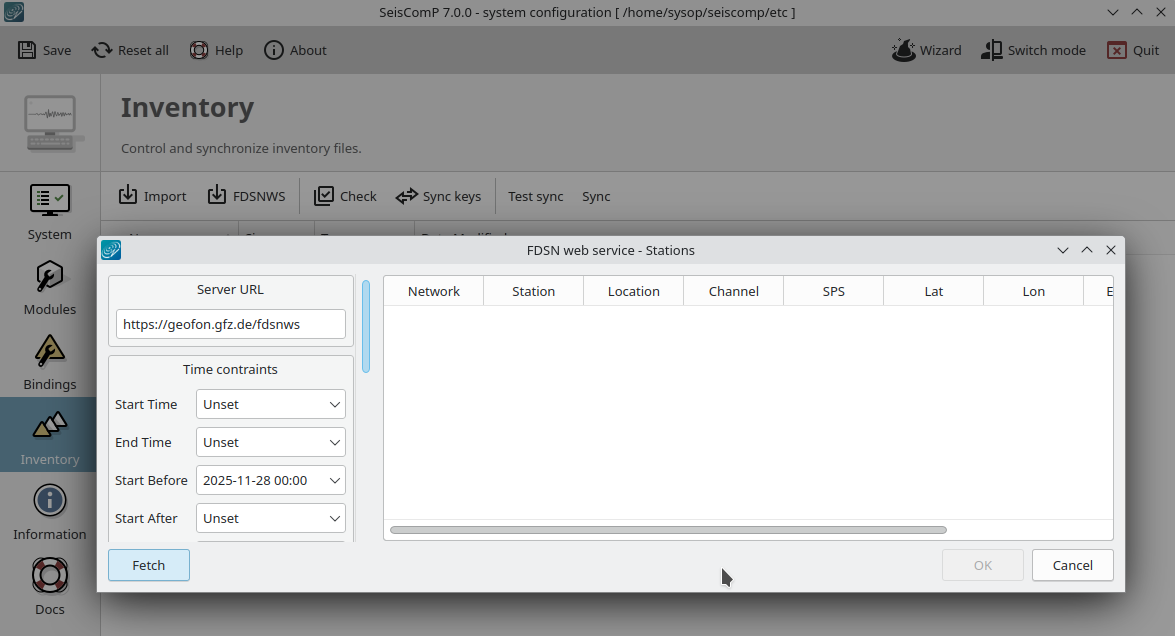
In the inventory panel you can still integrate your meta data from files with various supported formats but you may now take advantage off directly fetching complete inventory from FDSN servers. This makes inventory integration easy and efficient for you.
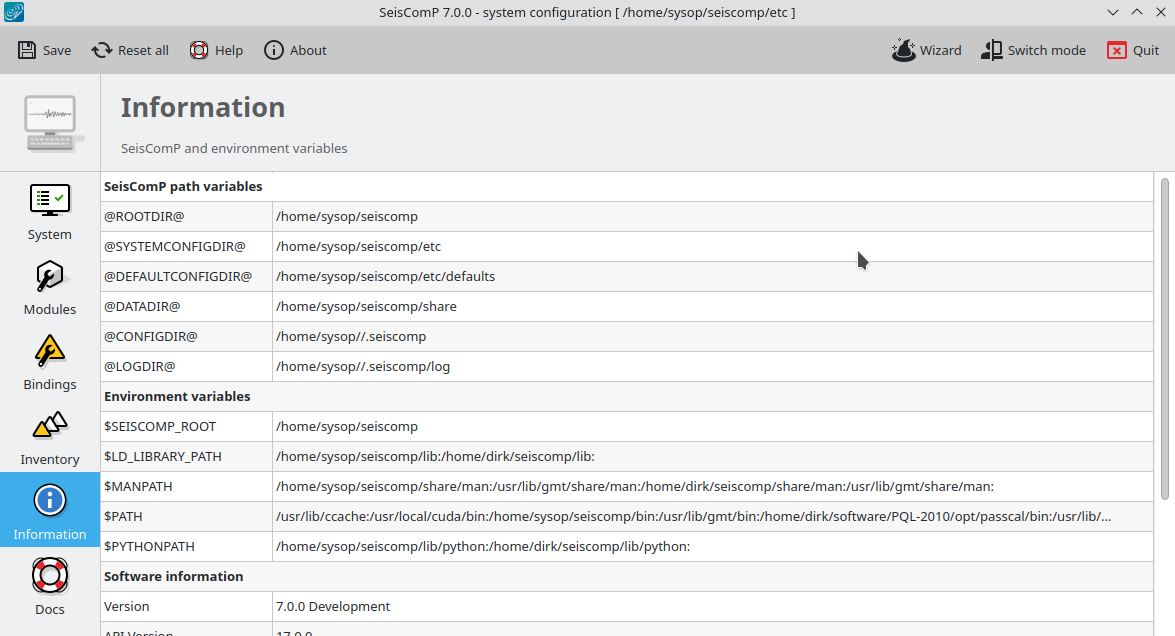
The information panel clearly indicates internal SeisComP variables which you may use in your configuration like @DATADIR@. However, the panel now also shows relevant environment variables and software information making it a valuable resource.
scmvx
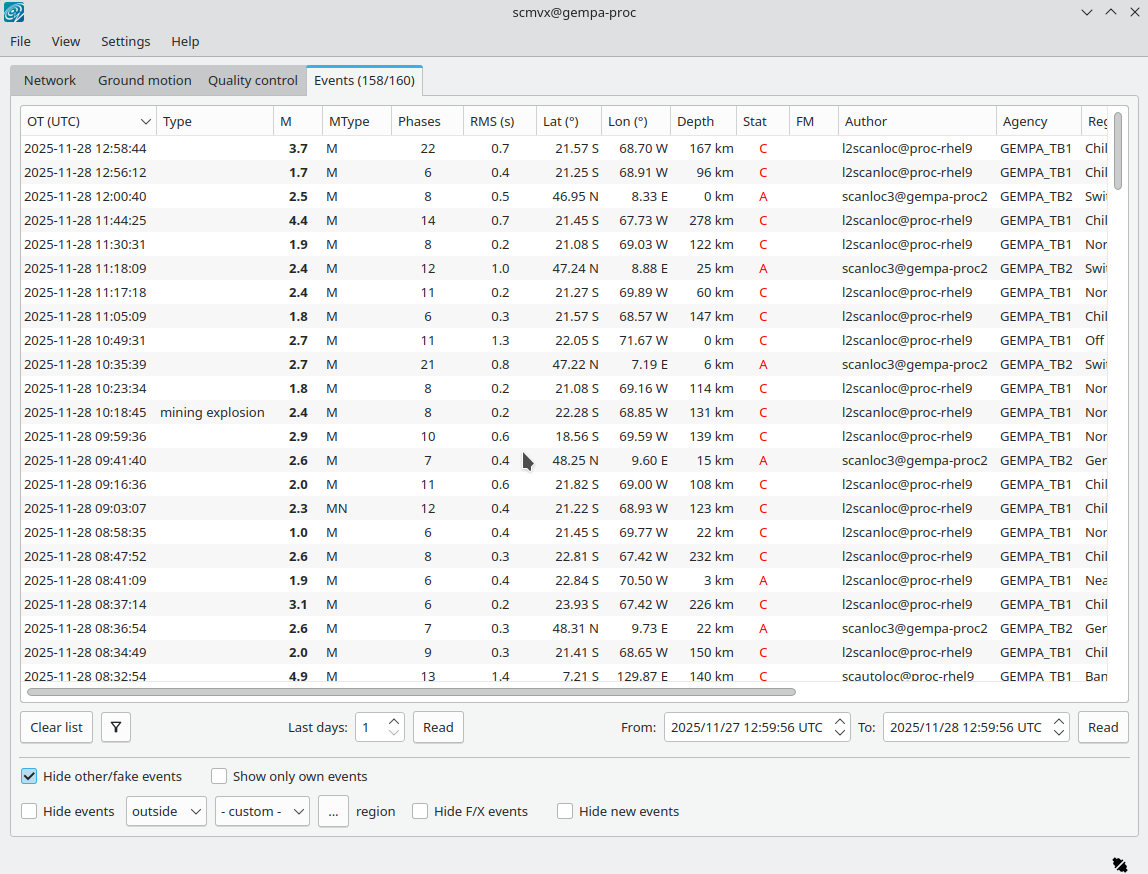
With SeisComP 7 we introduce scmvx, the new map view which will eventually fully replace the well known scmv. In scmvx you do not only have full access to station locations and event information stored in the SeisComP database or received in real time. scmvx will also analyze the inventory as well as the correctness of global bindings w.r.t. inventory for you and indicate issues.

scesv
Station annotations be plotted next to the corresponding symbol on the map. Navigate to the View menu or press ⇧+F9.
scmv
The module has been deprecated. All developments will continue in scmvx. However, scmv is still distributed along with SeisComP.
Amplitudes and magnitudes
We have unified the configuration of amplitudes and magnitudes in global bindings. For their configuration in scconfig you now need to create a profile with the corresponding type for the name of the profile. If you have made your configuration earlier before, then the profiles are immediately available.
All amplitudes and magnitudes now have identical standard parameters which can be modified up to the limits defined by the specific magnitudes. Common parameters for amplitudes include distance and depth ranges, time windows, minimum SNR, period and saturation tests as well as response correction. For magnitudes SeisComP checks again distance and depth ranges, SNR and period. Moreover, amplitude and magnitude-type specific parameters are added automatically to the profiles and if you wish to add your personally preferred SI unit to distance and depth parameters then you can now do so like
amplitudes.MLv.maxDist = 8deg
amplitudes.MLv.maxDepth = 80km
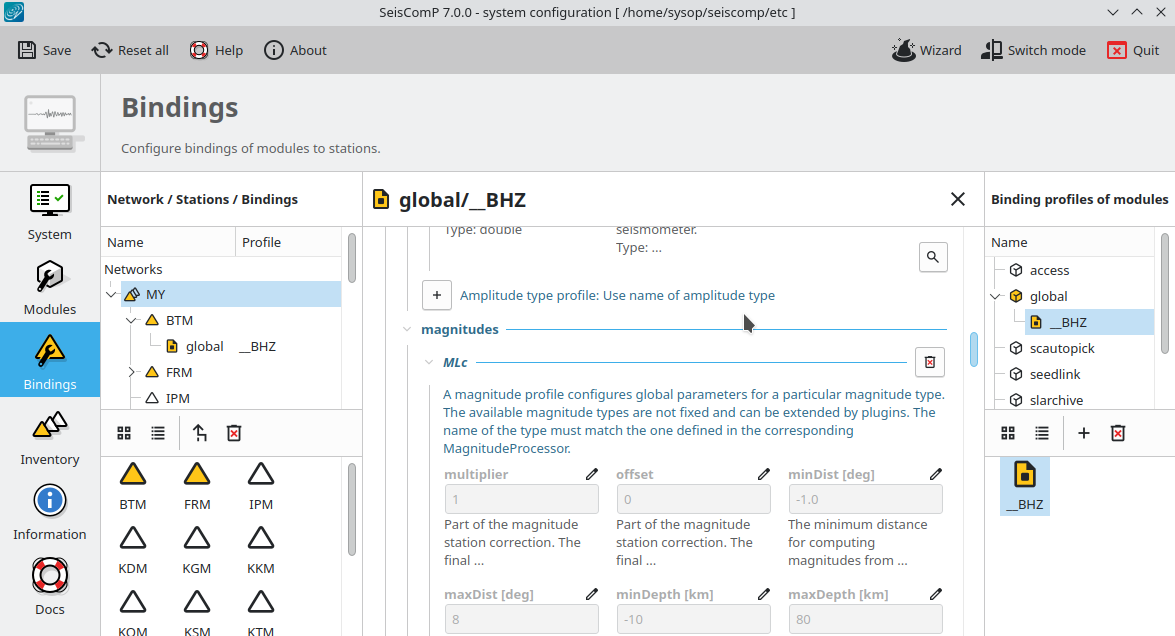
Our increasingly popular MLc magnitude has been upgraded and new coefficients have been added to the parametric calibration function allowing to explicitly consider source depth or exponential amplitude decay at short epicentral distances. For this magnitude type we have updated the documentation style which, in the future, may find application also for other magnitudes.
Automatic modules and command-line tools
Travel-time interface and locator
LOCSAT has become the default travel-time interface replacing libtau which is still supported. The change offers the ability to use custom travel-time tables. The behavior of scautoloc which relied on libtau before may change in rare circumstances but the travel-times are now consistent with the locator which is LOCSAT as well. For fully supporting the phases known in libtau, we have added LOCSAT tables for PKiKP and PKIKP phases and updated the one for PKKP.
arclink
The support for reading waveforms via the arclink RecordStream is finished and the arclink RecordStream is not part of SeisComP anymore. Use fdsnws instead as a more modern source which is now the standard and offered by most data centers.
Non-real-time playbacks
When printing event parameters in formatted XML to file or to stdout like in
playbacks using --ep, the output volume can become very large and difficult to
handle. For reducing the size, modules such as scautopick, screpick,
scautoloc, scamp, scmag, scevent now by default print unformatted XML into a
single line effectively reducing output volume. You may still print formatted
XML using the command-line option --formatted.
scevent
Instead of scevent setting the event region by the standard Flinn-Engdahl region you may define custom regions. Previously, fep files had to be provided but now you may also add your polygons in BNA or GeoJSON format which are to be added to the usual @DATADIR@/fep or $HOME/.seiscomp/fep directories.
scmsdemux
This is a new module for demultiplexing miniSEED records into individual files.
scdb
By the options -r and -x you may use scdb to delete specific objects or all
childs of base objects like Inventory or DataAvailability from the
database.
scxmldump
scxmldump may now be used to dump any object from the database into XML based
on the ID of the object. In addition, all child and root objects may be added.
Try out the options --public-id, --with-childs and --with-root.
Previously, dumping by ID was limited to events and origins.
ql2sc
To events the reference to focal mechanisms may be added in order to force the association of the focal mechanism to this event.
